A portfolio by
Aleem Siddique
Engineering · Imagination · Motion
Sc. 01 · The opening 00:00:00:00
Scene 01 EXT. The workbench · Night 24 fps · 2.39 : 1
Aleem Siddique / Product Development Engineer at AMD
Engineering. Imagination. I bring silicon into the world, build things you can play with, and write worlds you can get lost in.
Lens Circuit Book
Mechanisms & movement Silicon & systems Stories & imagined worlds
Scroll to discover ↓
Engineering✦ Imagination✦ Silicon✦ Motion✦ Stories✦ Play✦ Engineering✦ Imagination✦ Silicon✦ Motion✦ Stories✦ Play✦
Scene 02 INT. The lab · Day
The day job
Making Good engineering lives in the details, and in the trade-offs you find a way through.
AMD Product Development Engineer 2022–present
From bring-up to production. Over four years bringing up semi-custom products and improving the balance between silicon quality and manufacturing yield.
Xbox Steam Deck PlayStation 5 PlayStation 5 Pro Quality and yield. Together. Quality and yield can pull in opposite directions. My team and I worked to improve both together, challenging that trade-off through careful product development.
2nd
Asia Technological Showcase / 2024
An idea worth sharing. Recognition for my internally published technical paper at AMD’s annual Asia Technological Showcase.
Scene 03 The reel · Independent work
Independent work
Ideas you can experience. Working prototypes, learning systems and interactive worlds.
ICM Buddy Train a Tiny AI AI Rover Challenge Classility Novels Library Crosswinds in Sapa Embedded systems / Photography
2022
ICM Buddy Precise mechanics. Unexpected photographs. A camera-lens controller that makes creative movement repeatable.
My contribution Designed and implemented the hardware and firmware prototype, including calibration, lens movement sequences and on-device controls.
Outcome A working mechanism with documented long-exposure photographs, schematics and reproducible firmware. Take 01 ICM Buddy demonstration. Download the video .
Original ICM Buddy prototype footage showing the lens-control mechanism in motion. Browser AI / Learning
2026
Train a Tiny AI Draw it. Teach it. Test it. An approachable AI lesson that puts learning directly in your hands.
My contribution Built the drawing, teaching and prediction flow, integrated local ONNX inference, and packaged the runtime for offline use.
Outcome A self-contained browser experience with live predictions and an explicit display of the active compute backend. Take 02 Train a Tiny AI demonstration. Download the video .
An authentic Color Mixer training and testing recording with eight examples across four classes. This classifier learns from the visitor’s examples and is separate from the pretrained ONNX Shape Sorter. Simulation / Robotics
2026
AI Rover Challenge A virtual rover, a teachable classifier, and a clear view of why the machine made its next move.
My contribution Built the virtual rover workflow and interfaces for configuring components, teaching a classifier, programming rules and inspecting decisions.
Outcome Five browser missions in which students can run, pause, step and replay a rover, then examine its decisions and performance. Take 03 AI Rover Challenge demonstration. Download the video .
An authentic recording of rover setup, rule editing and a simulation run, including failure feedback for the learner to inspect and improve. Interaction design / Identity
2026
Classility A personality quiz that becomes a fantasy character, with an illustrated card worth keeping.
My contribution Built the question flow, weighted scoring and conditional class matching, result presentation and downloadable card experience.
Outcome A live fantasy quiz with twenty archetypes, dimensional scoring and individually rendered result cards. Take 04 Classility demonstration. Download the video .
An authentic quiz walkthrough from answer choices to an illustrated Classility result. Content systems / Writing
Ongoing
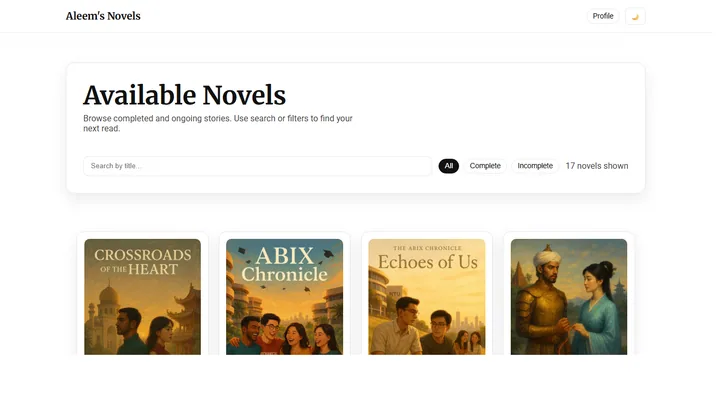
Novels Library An expanding collection of fictional worlds, with a reading experience designed to let the story take over.
My contribution Write the stories and develop the publishing workflow, searchable library and dedicated chapter reader that present them.
Outcome A static story library with genre discovery, reading settings, chapter navigation, bookmarks and alternate-ending support. Take 05 Aleem’s novel library showing illustrated covers and tools to find a story Interactive fiction / Narrative systems
Ongoing
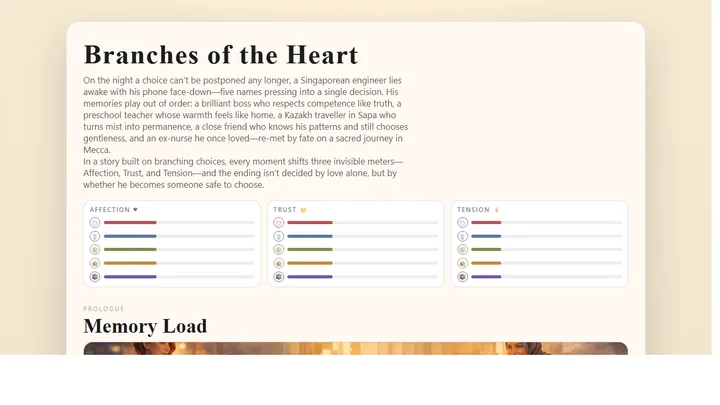
Crosswinds in Sapa A story that remembers your choices. Relationships become state, and state becomes an ending.
My contribution Connected branching scenes and relationship state to a browser story player, with a node-based editor for developing and testing routes.
Outcome A playable branching narrative with condition-based endings, local save slots, a story log and a visual authoring workflow. Take 06 Crosswinds in Sapa visual novel showing a scene and the choices that branch its story ICM Buddy Scroll through the collection
Now showing✦ Worlds made of words✦ Chapter by chapter✦ Read the story✦ Now showing✦ Worlds made of words✦ Chapter by chapter✦ Read the story✦
Scene 04 INT. The library · Late
Away from the circuit board
Worlds made Fiction about identity, relationships and imagined worlds, from contemporary Singapore stories to speculative thrillers and fantasy.
Open the full library Contemporary romance
Two colleagues navigate friendship, faith and the risk of admitting what they feel.
Read the story Speculative thriller
A full-sensory virtual world unsettles the boundary between a chosen identity and a life outside it.
Read the story Dark fantasy
An overlooked girl discovers a power to shift burdens, and turns it against a guild built on control.
Read the story Scene 05 EXT. The playground · Golden hour
The playground
Follow a different idea. Six small worlds. Each has a personality of its own.
Interfaces
A reflective personality quiz told through eight forces and a potion of your own.
Learning
An independent learning experiment about component budgets and hardware trade-offs.
Interfaces
An independent AMD-themed personality quiz with silicon-inspired archetypes.
Games
A browser strategy experiment inspired by the classic game.
Games
An experimental browser world inspired by campaign strategy.
Games
A familiar game loop, rebuilt for a quick browser session.
Scene 06 Close-up
A thread through it all
Curiosity My curiosity started with a Minecraft server in 2013. Writing plugins became a way to build something people could actually use. Today, that same instinct takes me from semiconductor product development to camera mechanisms, browser AI, and fictional worlds. I enjoy understanding the constraints, trying the difficult idea, and making the result clear to someone else.
B.Eng. in Computer Engineering, Nanyang Technological University. Specialisations in Artificial Intelligence and Cyber Security.
Connect on LinkedIn Watch the workbench motion study A motion study of the actual interactive 3D scene. Download the video .
Rendered from the interactive scene.
See the studio interpretation Studio interpretation of a lens, circuit and book. Download the video .
Generated concept visualization.
Project file 01 / 12 Close ×
ICM Buddy demonstration. Download the video .
Original ICM Buddy prototype footage showing the lens-control mechanism in motion. What I contributed Designed and implemented the hardware and firmware prototype, including calibration, lens movement sequences and on-device controls.
What came out of it A working mechanism with documented long-exposure photographs, schematics and reproducible firmware.
Giving a creative gesture a repeatable mechanism. Moving a camera lens during a long exposure can turn a familiar scene into trails, rings and tunnels of light. The gesture is expressive, but repeating the same focus and zoom motion by hand is difficult. ICM Buddy was my final-year project at NTU: a way to give photographers deliberate control over that movement.
I started with little camera knowledge and learned the photographic problem alongside the electronics. The aim was to help both experienced and new photographers explore long exposures through preset movements and custom sequences.
From motors to a usable photographic tool. Two stepper motors drive the focus and zoom rings. An Arduino Nano coordinates their movements with shutter timing, while a small TFT display and joystick provide controls on the device itself. Calibration establishes the permitted lens travel before a sequence starts.
My contribution connected the mechanism, circuit and firmware into a working prototype. Stored calibration and selectable patterns made it usable without a connected computer; the project documentation also includes the schematic and PCB design.
The constraint was inside the controller. The ATmega microcontroller has limited program space and memory. Calibration, motor control, menus and custom movements all had to fit in that budget. I worked through the firmware to reduce its footprint while retaining the behaviour that made the device useful.
That constraint shaped the project as much as the physical mechanism did. A successful motion was only part of the problem: the controls also had to make setup understandable and protect the lens from movement beyond its calibrated range.
The result is visible in the photographs. The completed prototype produced documented long-exposure images using focus, zoom and combined movements. The report shows the setup and photographic results, including Singapore architecture transformed through controlled lens movement.
This project taught me to treat firmware, hardware and the person operating them as one system. It remains a useful example of how a strict engineering constraint can create room for artistic exploration.
← TetrisTrain a Tiny AI → Project file 02 / 12 Close ×
Train a Tiny AI demonstration. Download the video .
An authentic Color Mixer training and testing recording with eight examples across four classes. This classifier learns from the visitor’s examples and is separate from the pretrained ONNX Shape Sorter. What I contributed Built the drawing, teaching and prediction flow, integrated local ONNX inference, and packaged the runtime for offline use.
What came out of it A self-contained browser experience with live predictions and an explicit display of the active compute backend.
Let people teach the model themselves. Machine learning is easier to understand when a learner can change the examples and see the effect. I built Train a Tiny AI for a STEM-booth setting, where visitors draw shapes or symbols, label their examples and test new drawings.
The app is designed to run offline after a one-time installation. That makes the lesson practical in a booth setting and keeps its central interaction independent of a cloud service.
Two pathways, two different lessons. The teachable pathway uses a small nearest-neighbour classifier built from the visitor’s drawings. A separate pretrained ONNX Shape Sorter recognises circles, triangles, squares and stars. The first makes training tangible; the second introduces how an existing model can run on available hardware.
My work connects the canvas, examples and predictions into a clear learning flow. I also integrated ONNX Runtime Web and the locally packaged model and runtime files, so inference does not require a CDN.
Detect capability, then use it. Accelerator availability depends on the browser, hardware and runtime. The application attempts available WebNN and WebGPU backends, verifies a usable session, and falls back to the CPU when acceleration cannot run.
The active backend is shown in the interface. The model running on an accelerator is the pretrained Shape Sorter; the visitor-trained classifier is a separate pathway. Making that distinction explicit keeps the demonstration understandable.
A small interface for a big idea. The result is a local drawing-and-prediction experience with a reproducible offline setup and a Python tool for regenerating the shape model. Learners can compare examples and predictions rather than simply watching a prepared animation.
This is an independent public learning project with an AMD theme. It illustrates machine-learning concepts and browser inference; it is separate from my semiconductor product development work.
← ICM BuddyAI Rover Challenge → Project file 03 / 12 Close ×
AI Rover Challenge demonstration. Download the video .
An authentic recording of rover setup, rule editing and a simulation run, including failure feedback for the learner to inspect and improve. What I contributed Built the virtual rover workflow and interfaces for configuring components, teaching a classifier, programming rules and inspecting decisions.
What came out of it Five browser missions in which students can run, pause, step and replay a rover, then examine its decisions and performance.
Robotics begins with cause and effect. AI Rover Challenge gives secondary-school learners a way to explore robotics without physical robots, accounts or cloud services. They choose components, train a small classifier, write ordered control rules and run missions in a Singapore-inspired environment.
The learning journey follows the full loop: sense, analyse, decide, move, test and improve. Five missions introduce these ideas progressively, from movement and obstacle avoidance to AI-assisted control and a rescue challenge.
Build it, run it, understand it. Component choices involve a budget and practical trade-offs. The AI lab exposes class balance and a confusion matrix. The programming lab turns an ordered IF/THEN list into readable pseudocode, while the simulator shows telemetry, sensor readings and a decision log.
My contribution brings those stages into one learning system. Learners can step through a run, rewind it and compare a changed design. Mission reports explain the outcome, and an engineering notebook keeps design decisions and reflections together.
The simulation has to stand on its own. Simulation and rendering are separate layers. The same behaviour can be examined through the graphical scene or an accessible text grid when WebGL is unavailable. This makes the important engineering concepts usable on more of the machines a classroom may have.
The scoring model values completion, reliability, energy, safety and responsible AI alongside speed. Physical hardware integration is future adapter work; the current public project is a virtual simulator.
A learning environment that explains its decisions. The public project includes the simulator, five missions, local progress storage, developer documentation and guides for students and educators. Its test suite covers simulation behaviour, scoring, rules and the workshop journey.
This is an independent public project with AMD-themed educational content. Compute comparisons in its technology corner are illustrative teaching material, rather than measurements of AMD products.
← Train a Tiny AIClassility → Project file 04 / 12 Close ×
Classility demonstration. Download the video .
An authentic quiz walkthrough from answer choices to an illustrated Classility result. What I contributed Built the question flow, weighted scoring and conditional class matching, result presentation and downloadable card experience.
What came out of it A live fantasy quiz with twenty archetypes, dimensional scoring and individually rendered result cards.
Turn a result into a character. Classility takes a familiar personality-quiz structure and gives it a fantasy vocabulary. Twenty questions map choices to RPG archetypes such as Paladin, Druid and Spellblade. The experience is playful: a way to explore identity, rather than a clinical assessment.
A result includes more than a class name. Lore, personality traits, a party role and a growth quest make each archetype feel like a character someone might want to inhabit.
Consistent logic beneath the atmosphere. Answers contribute weighted scores across six dimensions: Power, Faith, Arcana, Nature, Guard and Tactics. Conditional rules then select a class, with priorities handling overlapping matches. The same answers produce the same result.
My contribution covers the quiz flow, scoring and result presentation. Data defines questions, dimensions and archetypes, keeping the content separate from the interface and making matching behaviour inspectable.
The result has a life beyond the quiz. Illustrated cards combine a class sprite, equipment and party-role crest into a downloadable PNG. A dedicated card renderer also supports repeatable exports, while protected result routes avoid presenting an incomplete quiz as a finished profile.
Hash-based routing keeps the experience compatible with static GitHub Pages hosting. The mobile layout carries the same question and result flow onto a smaller screen.
A complete, shareable experience. The live project offers twenty archetypes, a card gallery and a reference for its scoring dimensions. Its source also includes tools for examining whether classes can be reached and how results are distributed.
Classility demonstrates how I connect deterministic behaviour with an expressive interface: the underlying system stays consistent while the result feels personal.
← AI Rover ChallengeNovels Library → Project file 05 / 12 Close ×
Aleem’s novel library showing illustrated covers and tools to find a story What I contributed Write the stories and develop the publishing workflow, searchable library and dedicated chapter reader that present them.
What came out of it A static story library with genre discovery, reading settings, chapter navigation, bookmarks and alternate-ending support.
Make room for the story. Writing is another way I explore how people make choices and how systems shape their lives. The library brings contemporary romance, speculative thrillers and fantasy into one place, while giving each story its own cover, description and chapter index.
As the collection grew, the publishing problem became a software problem too: how to organise chapters consistently, help readers choose a story and preserve a comfortable place to read.
A content workflow with a clear source of truth. Stories and chapter metadata live in Markdown. The reader builds static pages from that source, with titles, genres, series relationships and chapter ordering carried into the library. Python utilities support authoring and image preparation.
My contribution combines the writing with the tools around it. Keeping the source separate from its presentation lets the library grow without manually rebuilding each chapter’s navigation.
Discovery outside. Focus inside. The library supports text search, genre and status filters, series grouping and sorting. Inside a chapter, readers have font and layout settings, a theme choice, a table of contents and keyboard navigation.
Progress and bookmarks are stored locally, so readers can return to a chapter on the same browser. Stories with branching epilogues present a choice of endings and a way to visit the alternatives.
An ongoing publishing practice. The result is a growing library with a dedicated reader, rather than a collection of disconnected files. The portfolio presents a few starting points; the full library holds the broader collection.
The work shows a different side of the same engineering instinct: understand the content, give it a reliable structure and let the person using it concentrate on what matters.
← ClassilityCrosswinds in Sapa → Project file 06 / 12 Close ×
Crosswinds in Sapa visual novel showing a scene and the choices that branch its story What I contributed Connected branching scenes and relationship state to a browser story player, with a node-based editor for developing and testing routes.
What came out of it A playable branching narrative with condition-based endings, local save slots, a story log and a visual authoring workflow.
Choices that leave an afterimage. Crosswinds in Sapa follows a Singaporean engineer facing a personal decision through five relationships. The story moves through work, friendship, travel and memory. Choices affect affection, trust and tension, so an ending depends on the accumulated journey.
I wanted the interaction to carry part of the storytelling. A choice should do more than lead to the next paragraph: its effect can stay with a relationship and change what becomes possible later.
Narrative structure becomes a small engine. Scenes, choices and their effects are represented as structured data. The player updates relationship state, follows scene links and evaluates ending conditions. Local save slots, a story log and a back control make it possible to explore more than one route.
My contribution brings the narrative and the browser system together. The engine supports condition-based endings instead of reducing every path to a single last decision.
Build tools for the person writing the story. A visual node graph makes the scene structure visible, with pan and zoom for exploring the branches. Scene editing, ending-rule controls and a live preview provide a way to revise both the words and their behaviour.
JSON import and export keep the story portable. A local Python development server supports the editor’s file operations, while the published player remains a self-contained static website.
Writing and software share the same space. The public project includes a playable story and its authoring tools. It demonstrates how I think about state, navigation and content when the interface is itself part of the creative work.
It sits alongside the novel library as a different form of writing: one invites a reader to follow a story, while the other invites them to participate in its direction.
← Novels LibraryPotionality → Project file 07 / 12 Close ×
Project file 08 / 12 Close ×
Project file 09 / 12 Close ×
Project file 10 / 12 Close ×
Project file 11 / 12 Close ×
Project file 12 / 12 Close ×